
3Patti Loot Login & Account Setup Guide
Many users get confused when they open the app for the first time because the process is a bit different from other apps. You don’t need to create an account right away. The app gives you an option to start playing instantly.
If you are not sure how login and account setup works, don’t worry. This guide explains everything step by step so you can use the app without any issues.
How to Create an Account (Proper Method)
When you open this teen patti app, you will not see a typical “Sign Up” option. Instead, you will see two options:
- Logon
- Play as Guest
If you tap on Logon, it will ask for email/phone and password but this only works if you already have an account.
So, for new users, you need to follow this method:

Step-by-step account creation:
- Open the app
- Tap on Play as Guest
- Once the game opens, look at the top left corner
- Tap on your profile icon
- Now you will see an option called “Bound”, tap on it
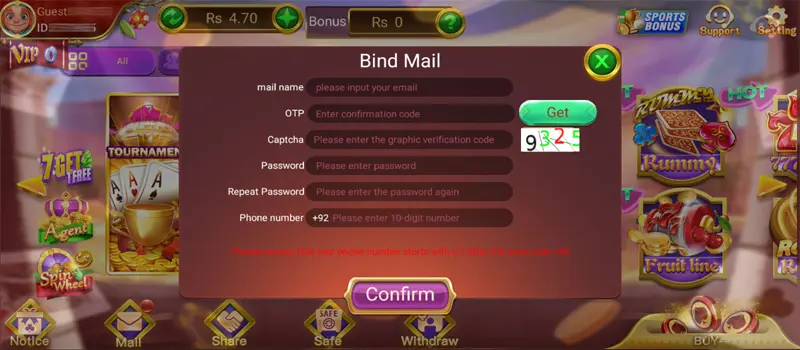
After tapping “Bound”, a form will appear. Fill it carefully:
- Enter your Email Address
- Below that, you will see an OTP box
- Tap on the “Get” button next to it
- You will receive an OTP on your email
- Enter the OTP in the box
Next steps:
- Enter the Captcha shown on the screen
- Create a Password
- Enter the same password again in Repeat Password
- Add your Phone Number
Finally:
- Tap on the Confirm button
That’s it. Your guest account is now converted into a proper registered account.
Login Steps (Already Registered Users)
If you already completed the above process, you can log in easily anytime.
Follow these steps:
- Open the app
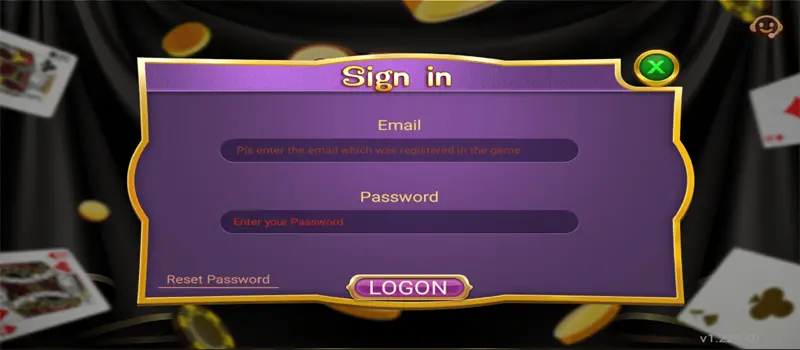
- Tap on Logon
- Enter your Email or Phone Number
- Type your Password
- Tap on Login
Now your account will open, and you can continue playing from where you left.
Common Login Issues & Fix
Sometimes users face small problems while logging in. Here are simple fixes:
- Wrong password > Double-check your password or try resetting it
- OTP not received > Wait a few seconds or tap “Get” again
- App not opening > Restart your phone and try again
- Internet issue > Switch to a stable connection
- Captcha error > Enter it carefully or refresh it
If your account still doesn’t work, try logging in again after some time.